How food suppliers manage product spec updates across multiple customers without version chaos. Covers change triggers, version control, and distribution workflows.

Maikel Fontein
9 min
min

A formulation changes on a Tuesday. The Technical Manager updates the master spec and sends the revised version to the customer who raised the question. By Friday, that customer has version 4. Two other customers still have version 3. The retailer portal has version 2 from six months ago. Production is working from a printed copy of version 1 that nobody thought to replace.
Nobody made a mistake. There was just no workflow to make sure the update reached everyone who needed it, in the right format, with the old version retired.
This guide is for Technical and Quality Managers at food and beverage suppliers who manage product specifications across multiple customers. It covers what triggers a spec update, how to run the update process without creating version chaos, and what controlled version management looks like in practice.
Why product spec updates cause more problems than the original change
A formulation change, a new certification, a packaging revision: the change itself is usually straightforward. The problem starts when the spec does not keep pace. Customers are checking deliveries against the allergen declaration you sent them. Auditors are comparing what your spec says to what they find on site. When the spec does not reflect the current product, a change made cleanly internally creates problems externally.
Allergen changes cannot wait. A raw material switch that introduces a new may-contain risk requires immediate spec updates to every customer holding that product. An update that does not reach a customer in time is a food safety issue, not a document management problem.
For non-allergen changes the operational cost is real but lower. Delivery rejections based on outdated dimension specs. Customer queries about nutritional data that does not match the current formulation. Audit findings about version history that cannot be demonstrated. All of these trace back to an update that was made internally but never properly distributed.
What triggers a spec update and who should know about it?
Not every internal change requires an immediate spec update to every customer. The urgency level depends on what changed and what customers are checking against your spec.
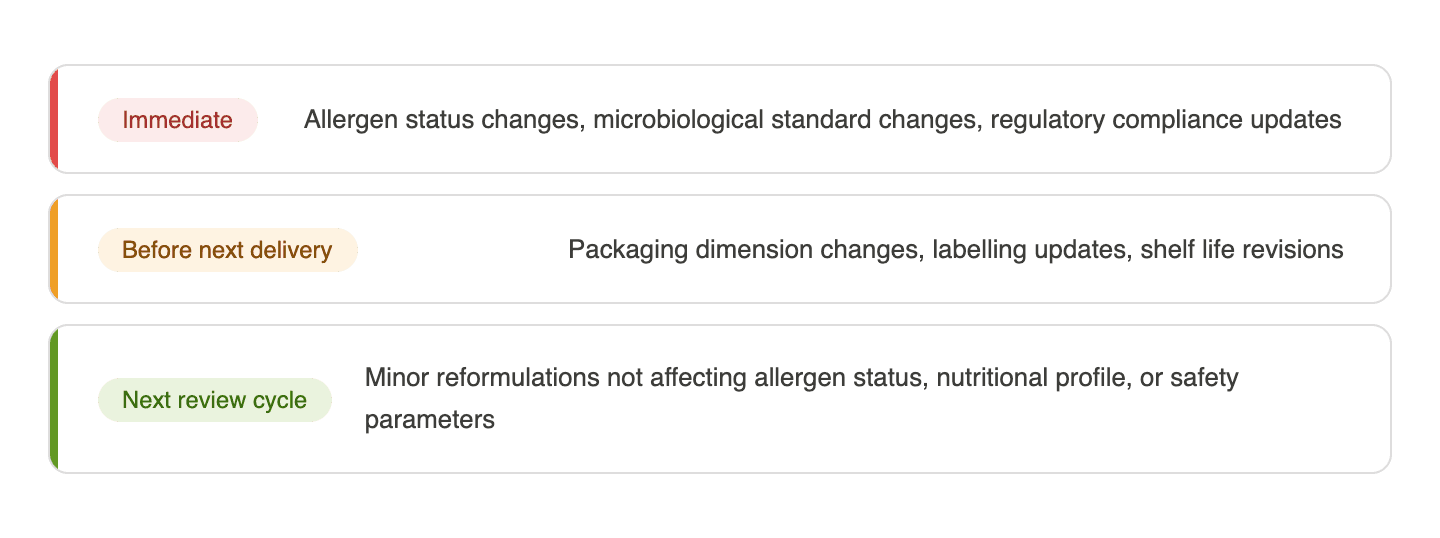
Whoever coordinates spec distribution needs to know about a change before the updated document is produced, not after. In practice, changes are often approved by product development or procurement teams who do not automatically loop in the technical coordinator. A simple notification, a shared tracker entry or an email when a change is approved internally, prevents updates going out to one customer while others are left with the previous version.
The four stages of a controlled spec update workflow
Stage 1: Change notification When a change is approved internally, the relevant team notifies the technical coordinator: what changed, which products are affected, which customers hold specs for those products, and the urgency level. That notification happens before the updated document is produced.
Stage 2: Master spec update Working from that notification, the technical coordinator updates the master spec: new version number, date of change, brief description, approver name. The previous version is archived, not deleted.
Stage 3: Customer spec distribution Using the customer register, the coordinator identifies every customer holding a spec for the affected product. Updated customer-facing versions are generated from the master, formatted to each customer's requirements, and distributed through the correct channel. The distribution is recorded in the register with the date, version number, and recipient for each customer.
Stage 4: Version retirement Once the updated spec has been distributed and confirmed, the previous version is formally retired. Any copies held in shared drives, printed in production areas, or saved in personal folders are replaced or removed. This step is the most commonly skipped and the most common source of version chaos.
How version chaos actually happens in food supplier teams
The most common pattern: a spec is updated for one customer who requested it. The update is saved in a shared folder under a new filename. The previous version is still in the same folder. Nobody deletes it because it might be needed for reference. Three months later, a colleague preparing a submission for a different customer finds the folder, sees two files, and sends the wrong one.
A second pattern: a spec is updated in the portal for one retailer but the same product is supplied to two other retailers through different portals. The update was time-sensitive so the coordinator focused on the customer who flagged it and planned to update the others later. Later never comes. Six months on, a routine audit at the second retailer reveals the spec on file predates a formulation change that affected the allergen declaration.
A third pattern: the master spec is updated correctly but the version number is not incremented. The updated document has the same filename and version number as the previous one. When a customer queries which version they received, the version history shows two documents with identical identifiers and no way to distinguish which was sent when.
What does good version control look like for product specifications?
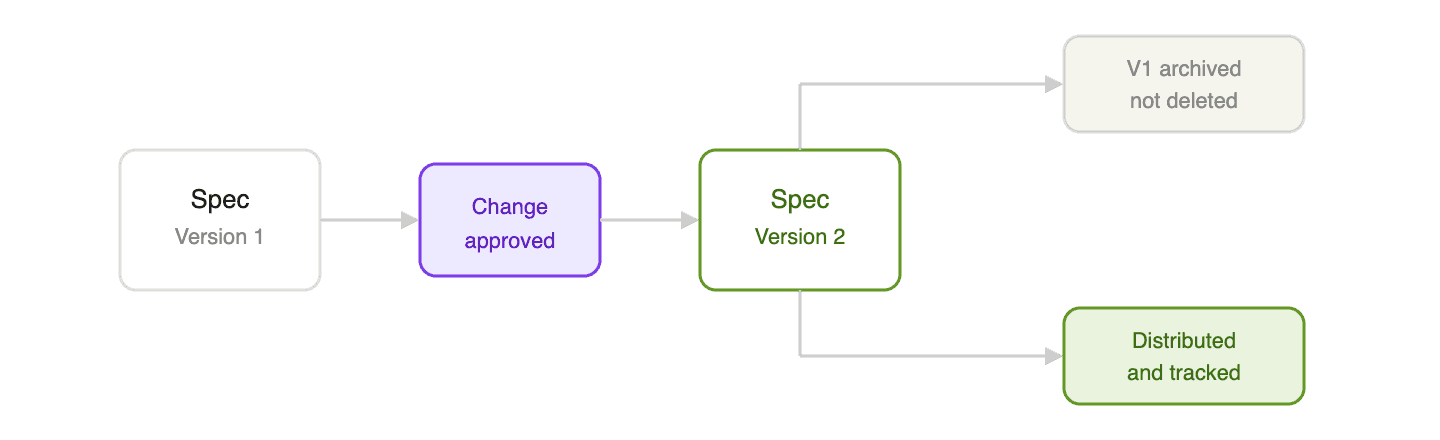
Every version has a unique identifier. Version numbers increment with every change. The version number and date appear on the face of the document. When a customer or auditor asks which version they have, the answer is visible without opening the file properties.
Every version has a change log. A simple table at the bottom of the spec or in a separate register recording the version number, the date, what changed, and who approved it. This is the audit trail that demonstrates controlled change management when a BRCGS auditor or retailer technical team asks for it.
Previous versions are archived, not deleted. Retired versions are moved to a clearly labelled archive folder that is accessible but distinct from the current version folder. The current folder contains one version of each spec.
Distribution and portal submissions are tracked together. For every spec update sent to a customer, the version number, the date sent, and the channel are recorded in the customer register. A spec updated internally but not in the customer's portal is not controlled. Portal submissions are part of the update workflow, not a separate task to complete when convenient.
A realistic scenario: one ingredient change, three outdated specs
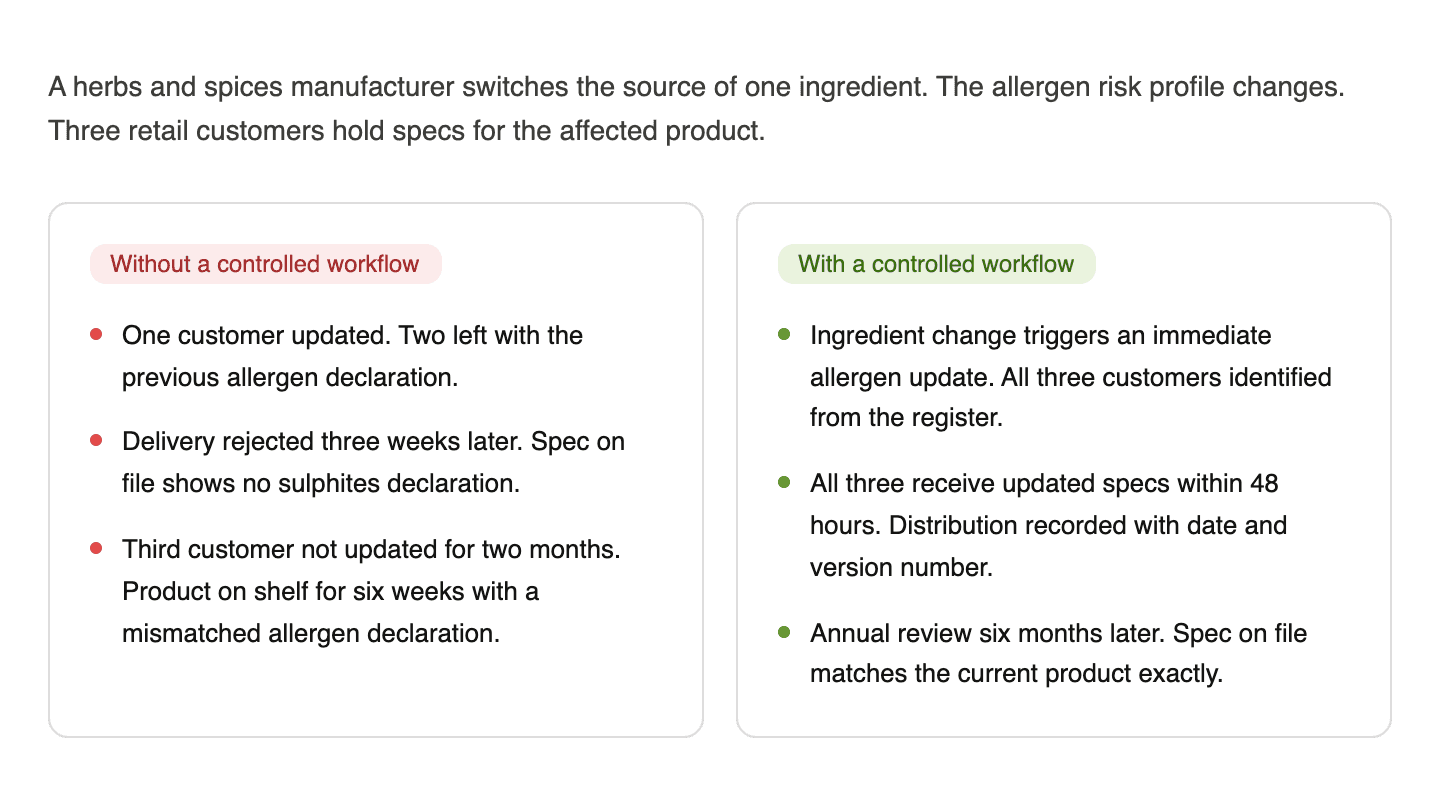
Without a controlled workflow:
The QA Manager updates the master spec and sends the revised allergen declaration to the customer who asked.
She adds a note to update the other two. A production issue takes priority.
Three weeks later, a second customer receives a delivery. Their goods-in team checks the allergen declaration against the spec on file. The spec shows no sulphites declaration. The delivery is rejected.
The third customer is not updated for another two months, until their annual supplier review flags the discrepancy. By that point the product has been on shelf for six weeks with an allergen declaration that does not match what their technical team was holding.
With a controlled workflow:
The ingredient change triggers an immediate allergen update. The QA Manager updates the master spec to version 5 and checks the customer register.
All three customers receive updated specs within 48 hours, formatted for their respective portals. Distribution is recorded with the date and version number for each.
The previous version is archived. When the third customer's annual review takes place six months later, the spec on file matches the current product exactly.
What are the key benefits of a controlled spec update workflow for food suppliers?
Fewer delivery rejections. When spec updates reach customers before the changed product does, goods-in teams check deliveries against accurate documentation. Rejections based on outdated specs drop significantly.
Audit readiness on demand. A version history, change log, and distribution record give auditors the evidence they need to verify controlled change management without reconstruction.
Faster response to allergen changes. A defined workflow with clear urgency levels means allergen-related updates are distributed immediately rather than queued alongside lower-priority tasks.
No version confusion internally. When previous versions are properly archived and current versions are clearly identified, the right document is always in the right place.
A defensible record when things go wrong. If a customer raises a complaint or an auditor questions a historical spec, the distribution record shows exactly what was sent, to whom, and when.
Checklist: when a product specification needs updating
Before updating the master spec |
|---|
✔ Change has been formally approved through internal change control |
✔ All affected products have been identified |
✔ Urgency level confirmed: immediate, before next delivery, or next review cycle |
✔ Technical coordinator notified before the update is produced |
Updating the master spec |
|---|
✔ Version number incremented |
✔ Date of change recorded on the document |
✔ Change description added to the version history log |
✔ Approver name and date recorded |
✔ Previous version moved to archive |
Distributing to customers |
|---|
✔ Customer register checked to identify all customers holding specs for affected products |
✔ Customer-facing versions generated from the updated master |
✔ Each version distributed through the correct channel for each customer |
✔ Distribution recorded in the register with date, version number, and recipient |
✔ Customer portal submissions completed alongside email distributions |
After distribution |
|---|
✔ Previous version retired from all active locations including shared drives and production areas |
✔ Customer confirmations of receipt recorded where required |
✔ Next scheduled review date updated in the customer register |
Conclusion
Product spec updates are not complicated in principle. What makes them complicated is the gap between updating the master internally and making sure every customer, portal, and internal location reflects the current version. That gap is where version chaos lives.
The four things worth remembering:
Not every change needs an immediate update to every customer. Knowing which triggers require which urgency level is the first step to a controlled workflow.
Version control only works when previous versions are properly archived and cannot be accidentally used alongside current ones.
Track every distribution. A spec update with no record of who received it and when cannot be defended in an audit or a customer dispute.
Customer portals are part of the version control system. Submitting an update by email but leaving the old version in the customer portal means the update has not been distributed.
If your team is managing spec updates manually across multiple customers and relying on individual memory to make sure every version reaches everyone who needs it, Passionfruit can help. It keeps your approved documents current, tracks distribution across customers, and ensures the right version is always on file. Book a demo here to see what that looks like with your actual product range.