Most TDS errors are not formulation problems. They are workflow problems. This guide breaks down what food suppliers can safely automate and where human review is non-negotiable.

Maikel Fontein
9 min
min

A customer requests an updated technical data sheet for a product you have supplied for three years. The formulation has not changed but your FSSC 22000 certificate was renewed last month with a slightly different scope. Someone on the team pulls last year's TDS, updates the date, and sends it. The certificate reference is still the old one. The customer's technical team flags it six weeks later during a routine supplier review.
This is what happens when technical data sheet workflows rely on memory and individual judgment rather than a defined process.
This guide is for Quality and Technical Managers at food and beverage manufacturers who manage technical data sheets across multiple customer relationships. It covers where automation genuinely helps, where it creates risk if human review is removed, and what a controlled process looks like in practice.
Why technical data sheet workflows break down when you supply multiple customers
For a supplier managing twenty products across fifteen customers, each with their own format requirements, portal submissions, and update triggers, TDS management stops working without a system. Documents sit in shared drives with unclear version histories. Updates get made for one customer but not others. A reformulation triggers a specification update but nobody checks which customers are holding the old technical data sheet. A certificate renews with a new scope and the change never reaches the documents already on file with three retailers.
This creates liability, not just inefficiency. A technical data sheet that goes out with incorrect allergen information, an outdated certification reference, or a microbiological standard that no longer reflects current product testing puts the technical team in a difficult position when a customer audits documentation or a non-conformance surfaces. The question is not just whether the product was right. It is whether the document was right, and whether a qualified person reviewed it before it went out.
What does a technical data sheet contain and why does it matter which elements you automate?
Not all TDS content carries the same risk. The table below shows which elements are safe to automate, which need verification before automation populates them, and which must always go through human review.
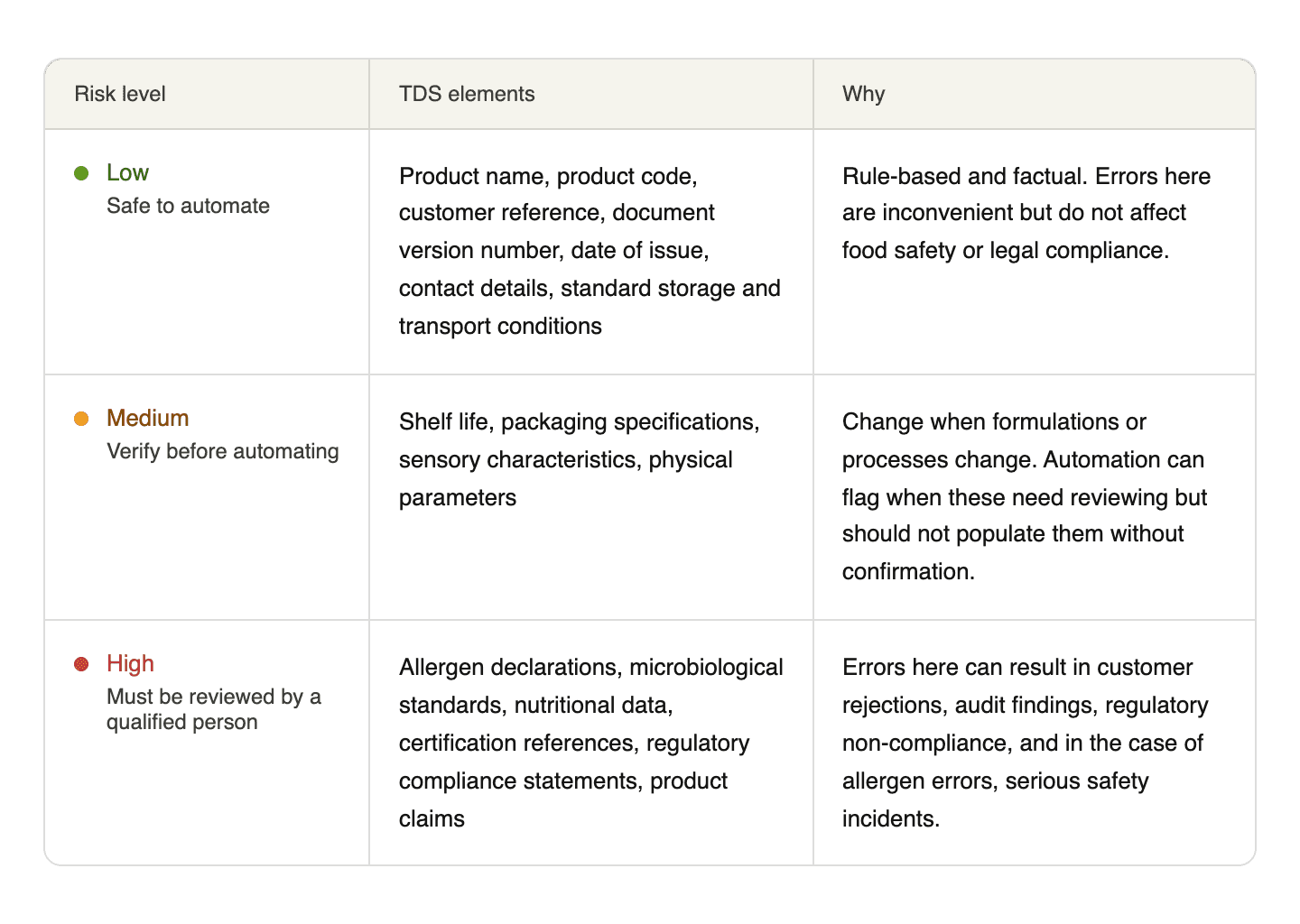
What is safe to automate in a technical data sheet workflow?
Document generation and formatting
Pulling approved product data from a central source to populate a TDS template in the correct customer format is rule-based work. If the source data is accurate and approved, the generated document reflects it. This removes manual reformatting without affecting document quality.
Version tracking and numbering
Every technical data sheet should carry a version number and date of issue. Automating this removes the risk of two versions of the same document circulating with the same reference, which is a common audit finding.
Distribution and submission
Routing a completed, approved TDS to the correct customer contact or portal is a logistical task. Automation ensures the right document reaches the right place without relying on someone remembering which portal each customer uses.
Expiry and renewal alerts
Certifications, audit reports, and testing data have expiry dates. Automated alerts that flag upcoming renewals give the technical team time to update affected technical data sheets before customers notice a discrepancy.
Customer register maintenance
Tracking which customers hold which version of which TDS, when it was last submitted, and when it next needs reviewing is a record-keeping task that automation handles more reliably than a manually maintained spreadsheet.
What these have in common is that they are process tasks, not judgment tasks. They move documents, track versions, send alerts, and keep records. None involve deciding whether a specification is correct, a claim is defensible, or a certification applies to the right scope.
What must always be reviewed before a technical data sheet goes out?
Element | Why it must be reviewed |
|---|---|
Allergen declarations | Must be verified against the current approved allergen risk assessment for the specific product and site. An ingredient supplier change, a new allergen on site, or a change in shared equipment use all affect this. No automated system can make that judgment. |
Microbiological and chemical specifications | Must match current validated process parameters and recent testing data. If a process change has occurred, carrying forward the previous version creates a document that no longer reflects the product. |
Nutritional data | Must reflect the current formulation. A recipe change affecting fat, sugar, or salt requires recalculation and verification before the TDS is reissued. Outdated nutritional data is a labelling compliance issue. |
Certification references | The certificate number, version, scope, certification body, and expiry date must match the current certificate exactly. A renewed BRCGS or FSSC 22000 with a different scope is one of the most common discrepancies found in customer technical audits. |
Regulatory compliance statements | Any claim of compliance with specific legislation must be reviewed by someone who knows whether it is still accurate. Regulations change. A statement that was correct eighteen months ago may not be today. |
Governance and sign-off | Every technical data sheet needs a named approver and an approval date. Not a generic stamp but a specific person who confirmed accuracy on a specific date. This is what protects the team when a customer or auditor questions a document. |
What does a controlled technical data sheet workflow look like in practice?
A controlled workflow has five stages defined before the first document is created.
Stage 1: Trigger identification
Document the events that require a TDS to be created or updated: new product development, formulation changes, certification renewals, new customer requests, and annual review cycles. Assign each trigger to a responsible role so nothing relies on someone remembering.
Stage 2: Source data verification
Before any technical data sheet is generated, confirm the approved product specification, current allergen risk assessment, latest testing data, and current certifications are all up to date. If any source data is out of date, update it before the document is produced.
Stage 3: Document generation
Using verified source data, generate the TDS in the required customer format. Automated formatting and population of low-risk fields happens here. Medium and high-risk fields are populated from confirmed source data and flagged for review.
Stage 4: Review and approval
A qualified person reviews the completed technical data sheet against the verified source data, confirms allergen declarations, specifications, certification references, and compliance statements are accurate, and records their approval with their name and the date.
Stage 5: Distribution and registration
Distribute the approved TDS to the customer through the correct channel and update the customer register with the version number, submission date, and approver name.
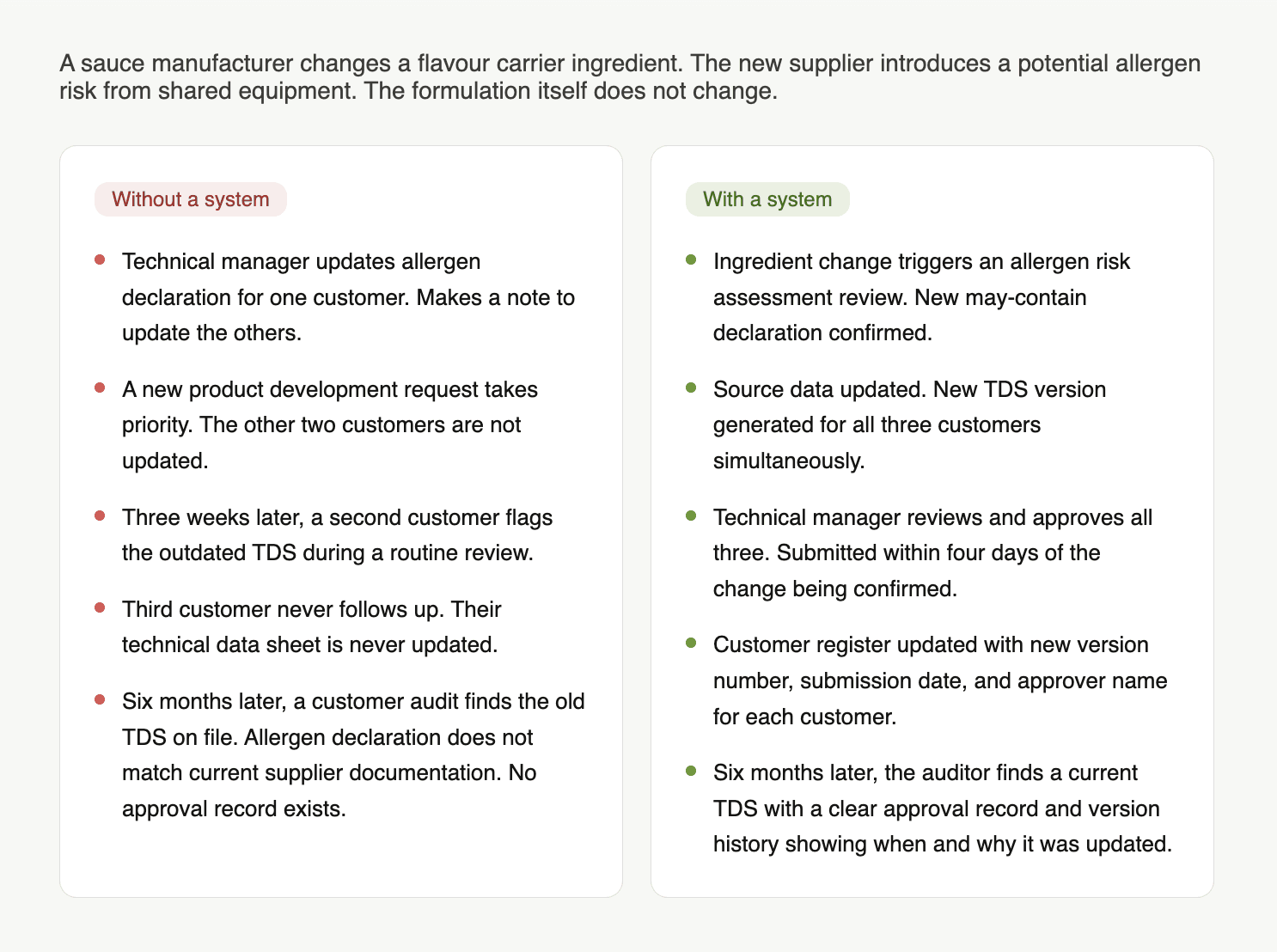
A realistic scenario: one product update, three customers
What are the key benefits of automating your technical data sheet workflow?
Faster turnaround without cutting corners. Automating formatting, distribution, and version tracking reduces time spent on process tasks so the technical team can focus on the review steps that require their expertise.
Consistent documents across every customer. When technical data sheets are generated from a single verified source, every customer receives the same accurate information in their required format. Inconsistencies between customer portals are eliminated.
Clear accountability for every document. A workflow with defined approval steps and recorded sign-offs means every TDS that leaves the team has a named reviewer and a date. This is the evidence that protects the team in audits and non-conformance investigations.
Fewer customer rejections and follow-up requests. Accurate, current technical data sheets reduce the volume of queries, resubmission requests, and audit findings that consume technical team time.
Proactive management of certification and data expiry. Automated alerts mean certification renewals and testing data updates are flagged before they create discrepancies in customer-facing documents.
Checklist: before a technical data sheet leaves your team
Source data |
|---|
→ Product specification confirmed as current and approved |
→ Allergen risk assessment reviewed and reflects current ingredients, suppliers, and site conditions |
→ Microbiological and chemical specifications match current validated process parameters |
→ Nutritional data reflects current formulation |
→ All certifications referenced are current, correctly scoped, and not expired |
Document content |
|---|
→ Allergen declaration matches current approved allergen risk assessment |
→ Certification references include standard, version, certification body, scope, and expiry date |
→ Regulatory compliance statements reviewed for continued accuracy |
→ Version number and date of issue are correct |
→ Customer-specific fields and format requirements have been met |
Approval and distribution |
|---|
→ A qualified person has reviewed and approved the document with their name and date recorded |
→ The TDS has been submitted through the correct channel for this customer |
→ The customer register has been updated with the version number, submission date, and approver |
Conclusion
Technical data sheet workflow automation is not about removing human judgment from the process. It is about removing the manual tasks that do not require it, so the people responsible for product quality and technical accuracy can focus on the steps that do.
The four things worth remembering:
Not all TDS content carries the same risk. Low-risk elements are safe to automate. High-risk elements including allergen declarations, certification references, and compliance statements must always be reviewed by a qualified person.
A controlled workflow with defined trigger points, source data verification, and recorded approval sign-offs is what makes a technical data sheet defensible when a customer or auditor questions it.
Automation that handles formatting, version tracking, distribution, and expiry alerts saves time without creating liability. Automation that populates safety-critical content without human review creates it.
Every technical data sheet that leaves your team should have a named approver and an approval date. That is the control that protects the team.
If your team is managing technical data sheets across multiple customers and spending more time on formatting and chasing than on reviewing, Passionfruit can help.
It works on top of your existing documents, automates the process tasks, and keeps the review and approval steps where they belong: with your team.
Book a demo here to see what that looks like with your actual product range.