Rejected uploads, missing fields, wrong file formats. This is a guide for food and beverage suppliers on how to submit documents through customer portals faster, with fewer errors and no last-minute scrambles.

Maikel Fontein
9
min
You have the documents. The certification is current. The allergen declaration is accurate. And you are still spending two hours on a submission that should take twenty minutes, because the portal wants a PDF but you have a Word doc, the file size limit is lower than you expected, a mandatory field you did not know existed is blocking submission, and the customer contact who could tell you what format they actually need is not answering.
This is the supplier portal problem nobody talks about. Not whether the documents are right, but whether you can get them into the system without losing half a day in the process.
This guide is for Quality, Technical, and ESG teams at food and beverage manufacturers who submit documents across multiple customer portals. It covers why submissions get rejected, how to map portal requirements before deadline pressure hits, and what a faster, more reliable submission workflow looks like in practice.
Why every customer portal has different rules and none of them tell you upfront
If you supply to five customers and each uses a different portal, you are managing five different submission systems simultaneously. Each has its own file format requirements, field structures, document naming conventions, size limits, and validation rules. None of them are designed with the supplier in mind.
The frustration is not that the requirements exist. It is that they are inconsistent, rarely documented, and only become visible at the moment of submission when a deadline is already close. A document that passes validation in one portal gets rejected in another because the file name contains a character the system does not accept. A certificate uploaded successfully last year fails this year because the portal updated its size limit without telling anyone.
For food and beverage suppliers managing certifications, audit reports, allergen declarations, and questionnaire responses across multiple customers, this is not a minor inconvenience. It is where time goes.
EcoVadis, SEDEX, Trace One, retailer portals: what your team is actually navigating
The portal landscape for a mid-size food and beverage manufacturer typically includes some combination of the following:
→ EcoVadis is used by many large retailers and brand owners to assess supplier sustainability performance. It has its own structured questionnaire interface, a 55-document upload limit, specific file format requirements, and a submission window that opens and closes on a fixed schedule. Uploading the wrong document type or exceeding the document limit means going back to remove files before you can proceed.
→ SEDEX is widely used in food and beverage for ethical trade audits and self-assessment questionnaires. Suppliers manage their own SEDEX profile and share data with customers through the platform. Document uploads here need to match the specific audit cycle and customer relationship settings, which vary by customer.
→ Trace One is used by a number of European retailers for product specification and technical document management. It has structured fields that map to specific data points in the customer's system. A document submitted here needs to populate the right fields, not just exist as an attachment.
→ Retailer-specific portals are increasingly common. Major retailers including some in the UK, Netherlands, and Germany operate their own supplier management platforms with their own submission requirements, approval workflows, and document standards. These often have the least documentation available for suppliers and the steepest learning curve.
→ Customer-specific email or shared drive requests still exist alongside portal systems, particularly with smaller customers or for ad hoc document requests. These carry their own risks around version control and confirmation of receipt.
Most food suppliers are navigating at least three or four of these simultaneously, with different deadlines, different contacts, and different requirements for what constitutes a complete and acceptable submission.
The four reasons a portal submission gets rejected (and how to avoid each one)
Rejection reason | Why it happens | How to avoid it |
|---|---|---|
Wrong file format | Each portal specifies accepted formats. A certificate that works in one portal gets rejected in another because of a format or conversion issue. | Check the portal's format requirements before preparing documents, not at the point of upload. Keep a converted or compressed version of regularly submitted documents alongside the originals. |
Missing mandatory fields | Mandatory fields are often buried in sections that appear optional until the system blocks submission at the final step. A submission that is 95% complete but missing one mandatory field cannot be submitted. | Walk through the full portal interface once before your first real deadline, mapping every mandatory field and noting which require specific data formats or dropdown selections. |
Naming or metadata issues | Some portals validate file names against specific conventions. Special characters, spaces, or names exceeding a character limit cause upload failures. | Establish a consistent naming convention that works across portals and clean metadata from converted files before uploading. |
Expired or out-of-scope documents | A certificate past its expiry or scoped to the wrong site gets flagged automatically or rejected during the customer's manual review. The clock resets either way. | Check expiry dates and certification scope before submitting. A document tracker that flags upcoming expirations gives you time to act before they become blockers. |
How to map each customer portal's requirements before deadline pressure hits
The teams that submit documents fastest are not the ones who work hardest when a deadline arrives. They are the ones who have already mapped what each portal needs before any specific submission is due.
A portal requirements map is a simple reference document, one page per major portal or customer, that captures:
Accepted file formats and maximum file sizes
Mandatory fields and their data format requirements
Document naming conventions or restrictions
The submission window or deadline structure
The contact name and email for portal access issues
Any known quirks or common rejection reasons from previous submissions
This does not need to be built all at once. Start with your highest-volume portals and build the reference as you go. After each submission, add anything you learned to the relevant portal entry. Within two or three submission cycles, you have a reference that removes the trial and error entirely.
The same logic applies to document preparation. If EcoVadis requires a specific document format and your BRCGS certificate arrives from your certification body as a high-resolution PDF that exceeds the size limit, you need to know that before the submission window opens, not on the day.
What a submission workflow looks like when it stops being a scramble
A submission workflow that works has three phases that happen in sequence rather than simultaneously under deadline pressure.
Phase 1: Preparation (before the deadline is imminent) Documents are pulled from a central, maintained source. Certifications are checked for expiry and scope. File formats are confirmed against the portal's requirements. Any documents that need converting, compressing, or renaming are handled now. If a document is missing or out of date, there is still time to request it or update it.
Phase 2: Submission (when the portal window opens) With documents prepared and validated, the submission itself is a process of uploading and completing fields rather than a process of searching, converting, and problem-solving. Mandatory fields are completed from the portal requirements map. Documents are uploaded in the correct format and naming convention. The submission is completed and confirmed before the deadline rather than in the final hours.
Phase 3: Confirmation and recording (after submission) Submission confirmation is saved and filed. The customer register is updated with the submission date, the documents submitted, and the version numbers. If the portal provides a reference number or confirmation email, that is recorded alongside the submission. If the customer's review triggers a follow-up request, there is a clear record of what was submitted and when.
What makes this workflow faster is not speed at the point of submission. It is the absence of the preparation scramble that currently happens at the same time as the submission itself.
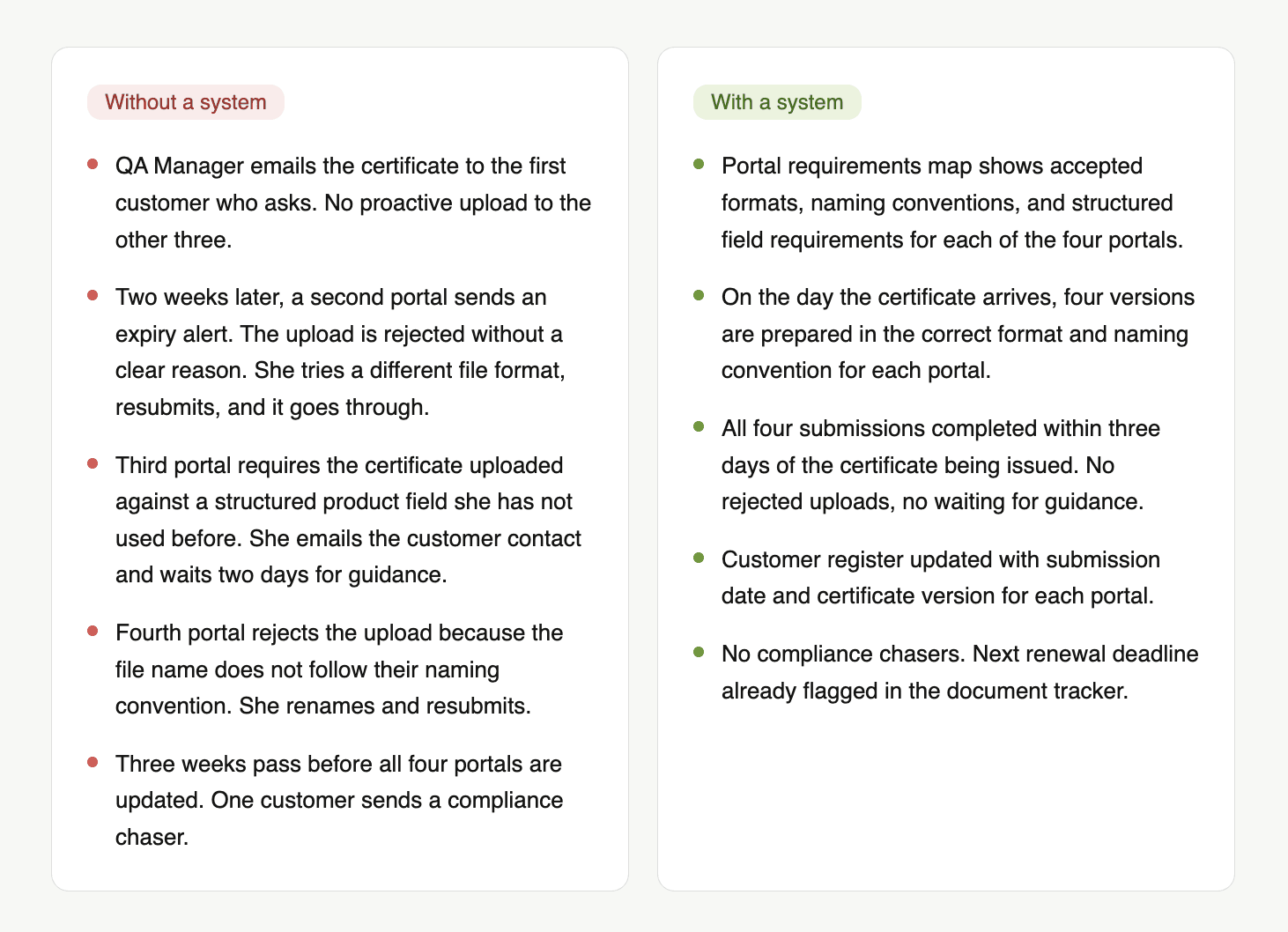
A realistic scenario: one FSSC 22000 renewal, four customer portals, one week
A dairy ingredients manufacturer renews their FSSC 22000 certification in March. The new certificate covers the same scope as the previous one. Four customers require the updated certificate to be uploaded to their respective portals within 30 days of renewal.
What are the key benefits of a systematic supplier portal submission process for food suppliers?
Fewer rejected submissions. Mapping portal requirements in advance eliminates the format, naming, and field errors that cause first submissions to fail and force resubmission under deadline pressure.
Faster turnaround on certification updates. When documents are prepared correctly for each portal before the submission window opens, the upload itself takes minutes rather than hours.
No missed submission windows. A document tracker and portal deadline calendar means renewal deadlines and submission windows are flagged in advance, not discovered when a customer sends a compliance chaser.
A clear record of what was submitted where and when. A maintained submission register means any customer query about document status can be answered immediately without searching through email threads or portal histories.
Less pressure on the team during busy periods. When portal submissions are prepared systematically rather than reactively, the workload is distributed rather than concentrated at deadline moments when the team is already stretched.
Checklist: before you submit to any customer portal
Document preparation |
|---|
→ File format confirmed against portal requirements (PDF, Word, Excel, image) |
→ File size checked and compressed if necessary |
→ File name follows the portal's naming convention |
→ Document metadata cleaned if converted from another format |
→ Certification expiry date confirmed as current |
→ Certification scope confirmed as covering the relevant site and product |
Portal submission |
|---|
→ All mandatory fields identified and data prepared in the required format |
→ Any dropdown or selection fields checked against available options |
→ Supporting documents attached where required |
→ Submission previewed before final confirmation where the portal allows it |
→ Submission confirmed and confirmation saved or screenshotted |
Post-submission |
|---|
→ Submission date and document versions recorded in the customer register |
→ Portal reference number or confirmation email filed |
→ Next submission deadline or review date noted in the tracker |
→ Any portal issues or rejection reasons documented for the requirements map |
Conclusion
Supplier portal uploads for food suppliers are slow not because the documents are wrong but because the preparation happens at the same time as the submission. Every rejected upload, every format conversion, every search for a contact who can explain what a mandatory field actually requires, is time that could have been handled before the deadline arrived.
The four things worth remembering:
Every customer portal has different requirements. Mapping them once saves time on every submission that follows.
The four most common rejection reasons are wrong file format, missing mandatory fields, document naming issues, and expired or out-of-scope documents. All four are preventable with preparation.
A submission workflow that separates preparation from submission removes the scramble entirely. The deadline becomes a distribution task, not a problem-solving exercise.
A maintained submission register and document tracker gives your team visibility into what has been submitted where and flags what is coming due before a customer has to ask.
The reason portal submissions take so long is rarely the portal itself. It is that documents are not organised, formatted, and verified before the submission window opens. Passionfruit keeps your approved documents current, formatted, and ready to submit so that when a portal deadline arrives, the work is already done. Book a demo here to see what that looks like with your actual document library.